

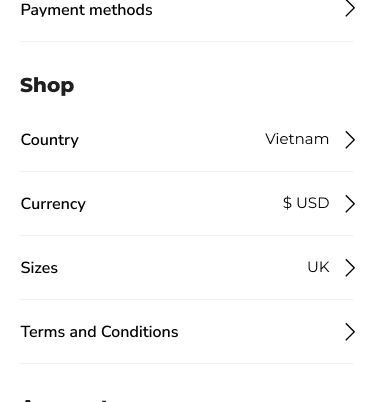
The TipTop App offers a robust Profile Settings section designed to give you complete control over your account, preferences, and privacy. Whether you’re managing your personal details, updating security settings, or configuring notifications, our profile options are built to ensure a seamless and personalized user experience.
Key Options in Profile Settings
1. Personal Information
Description:
Update and manage your personal details, including your name, email, contact number, and profile picture.
Key Features:
- Update profile details with ease
- Upload and change your profile picture
- Edit and verify your contact information
2. Security Settings
Description:
Ensure your account remains secure with advanced password management and two-factor authentication (2FA) options.
Key Features:
- Change your password anytime
- Enable/disable two-factor authentication (2FA)
- View recent login activity for added security
3. Notification Preferences
Description:
Control how you receive alerts and updates from the app with customizable notification preferences.
Key Features:
- Enable/disable push notifications
- Set preferences for email and SMS alerts
- Manage marketing and promotional notifications
4. Language & Regional Settings
Description:
Tailor your app experience with your preferred language and regional settings.
Key Features:
- Choose from multiple language options
- Set your preferred currency display
- Adjust time zone settings
5. Payment Preferences
Description:
Manage your saved payment methods and set default preferences for seamless transactions.
Key Features:
- Add/remove payment methods
- Set a default payment option
- View transaction history
6. Order & Purchase History
Description:
Easily access your order history and keep track of completed and pending purchases.
Key Features:
- View detailed order summaries
- Track ongoing and completed transactions
- Download order receipts
7. Privacy Settings
Description:
Take control of your data privacy and manage how your information is shared or displayed.
Key Features:
- Enable/disable data sharing options
- Manage third-party access permissions
- View and download your account activity log
8. Account Deactivation/Deletion
Description:
If needed, you can deactivate or permanently delete your account securely from the settings panel.
Key Features:
- Temporary account deactivation
- Permanent account deletion with confirmation prompts
- Option to download your data before deletion
9. Linked Accounts
Description:
Link your TipTop account with social media profiles or third-party apps for smoother login and integration.
Key Features:
- Connect social media accounts (Google, Facebook, etc.)
- Manage third-party app integrations
- Enable single sign-on (SSO) for quick login
10. Analytics and Insights
Description:
Access detailed insights about your app usage and performance metrics directly from your profile dashboard.
Key Features:
- View your activity summary
- Track app engagement analytics
- Customize analytics preferences
Why Use TipTop Profile Settings?
- ✅ Full Control: Customize every aspect of your account.
- ✅ Enhanced Security: Protect your data with advanced security options.
- ✅ User-Friendly Interface: Easy to navigate settings dashboard.
- ✅ Personalized Experience: Tailor preferences to suit your needs.
- ✅ Transparency: Clear visibility of account activity and linked services.
Leave A Comment